
Sign in to your company workspace
The company creates authorised accounts. Use the access details supplied by your office and complete any first-login password change. Open the private app; this public website does not create accounts.
Use the Worker App to add job context, capture before and after photos or short videos, and send useful material to the office.
Capture in the field. Review in the office. Export for your own publishing workflow.
The company creates authorised accounts. Use the access details supplied by your office and complete any first-login password change. Open the private app; this public website does not create accounts.
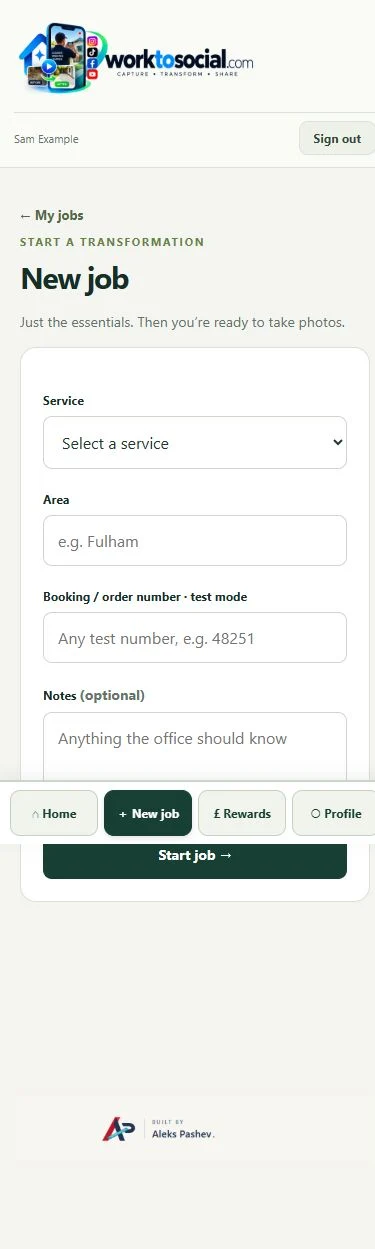
Create a job with a company service, area and booking or order reference. Services are configured for the company rather than shared across every business. Add a short note when the picture alone would be unclear.
The capture flow separates BEFORE, AFTER and SUBMIT. Use a consistent angle for a comparison. You can take photos or select from your photo library; check that selected files belong to this job.
Preview a steady clip before using it. Current capture allows clips up to 30 seconds and 60 MB. A video is optional; use it to explain motion, a result or a useful detail.
Keep the app open while uploads are waiting. Submitted material reaches the office for review. Capture and submission do not publish a post or grant permission for public use.
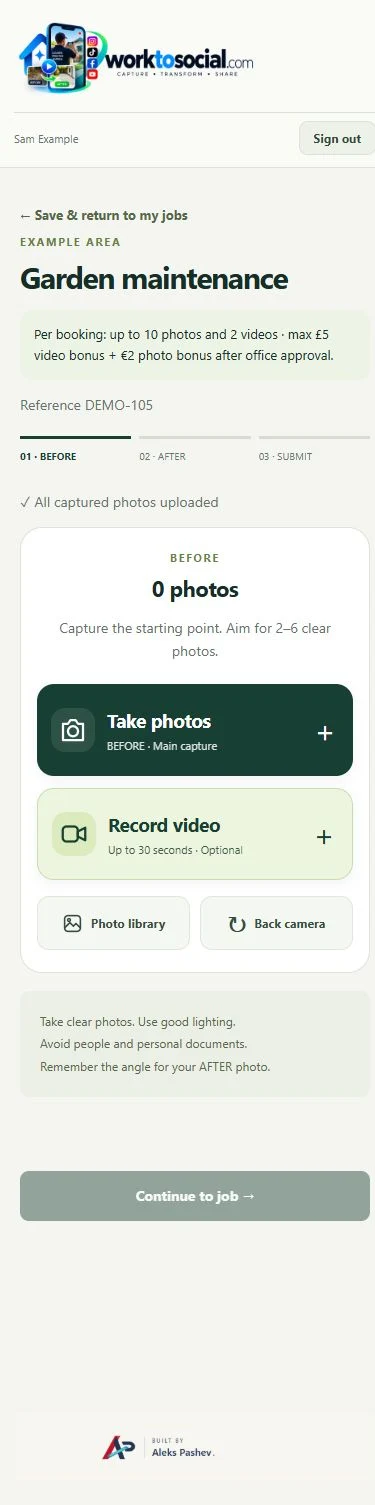
Select the correct company service, capture useful material and submit with a short explanation. Keep uploading until the handover completes.
See the Worker App →Read the job context, inspect the sources, make editing decisions and review the selected final files. Public use remains a deliberate business decision.
Explore the Office Dashboard →Keep the two phases together and select genuine comparisons.
Explore before & after →Crop, adjust, hide private details and add text layers.
Explore photo editing →Prepare a useful clip with reviewed sound, captions and branding.
Explore video editing →Inspect source media and the complete final export.
Explore office approval →Turn real jobs into consistent, branded content your office can review and use.
Discuss your team’s workflow with us.