
Treat a field upload as the start of a decision
A worker may send a clear photograph of a completed task with the intention of helping the business explain its work. The office still needs to decide whether the material is accurate, suitable and useful for the intended audience. The fact that an upload exists does not establish that it should appear on a public website or social page.
Separate the capture from the publishing decision. Ask what the photograph demonstrates, which service it relates to and what the business wants a viewer to understand. A visually impressive image without enough context can invite a misleading caption. A routine image with a precise explanation can sometimes tell a more useful story.
WorkToSocial Media & Social is coming soon and is not available to purchase. Its planned workflow places office review between field capture and preparing finished files. This guide explains the human decisions around that handover; it does not describe automatic permission checking or an active automatic social posting feature.
Start with the job context, not the crop tool
Read the worker note and confirm that the material belongs to the correct job and service. Establish which phase it shows and whether the work shown is complete. If a pair is intended to show before and after, confirm that both images belong to the same task and represent the sequence accurately.
Ask for clarification when the note does not support the proposed caption. A photo of a tidy surface cannot by itself prove what treatment was used, how long the job took or whether an underlying problem was resolved. Avoid filling those gaps with an appealing marketing claim. The person who understands the work should verify the factual explanation.
Our before-and-after capture guide covers consistent framing and useful job context. Review those basics before investing time in editing. If the source cannot support a fair comparison, choose a single image with accurate wording or request another suitable capture.
Inspect the whole frame and every part of a clip
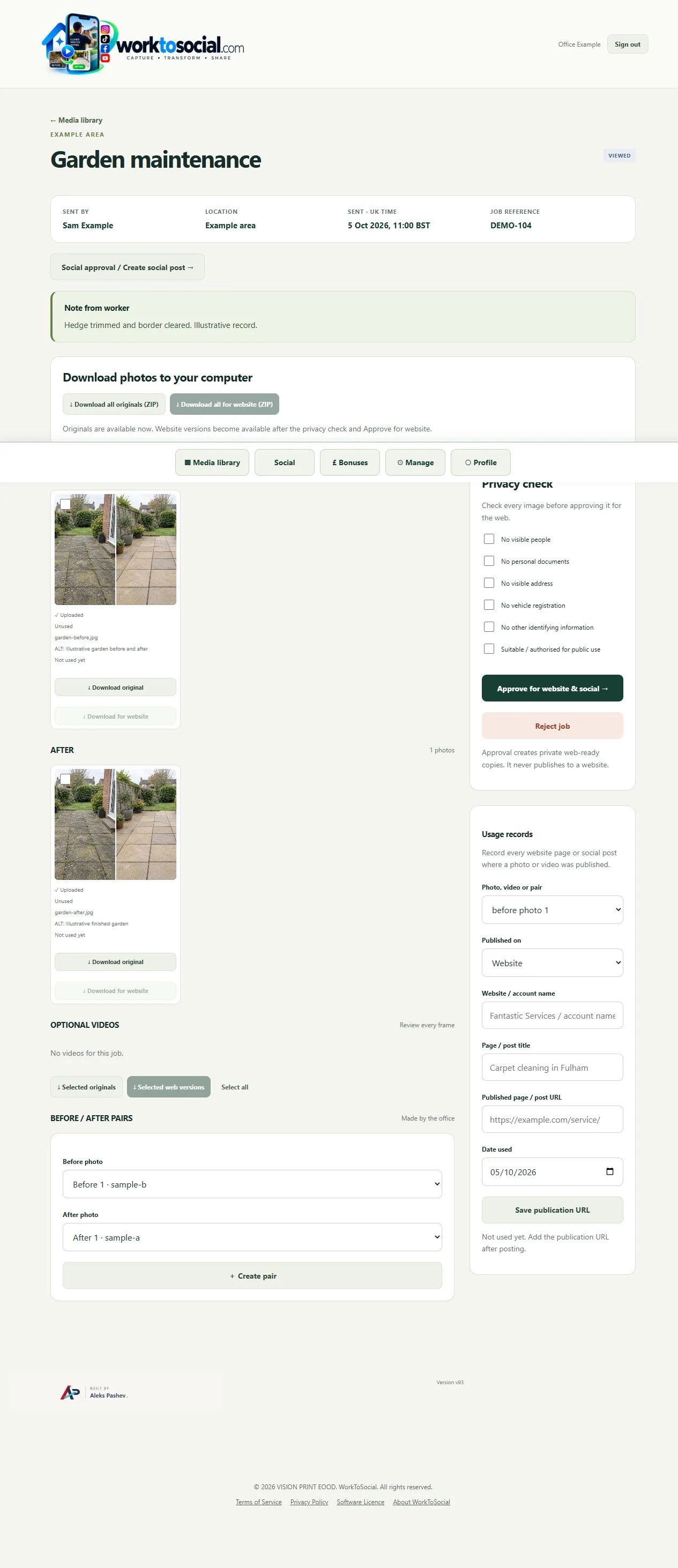
Look beyond the main subject. Background details may include documents, addresses, registrations, personal photographs, computer displays or other information unrelated to the work. Review the edges, reflections and areas that a small thumbnail makes difficult to inspect. Open the source at a useful size rather than approving it from a quick glance.
For video, review the complete clip and listen to the audio. A detail absent from the opening frame may appear when the camera moves. Conversations, spoken names or background sound can change whether a clip is suitable for the intended use. A selected cover image does not establish that the rest of the recording is appropriate.
Make a specific decision about anything uncertain. The reviewer may request a clearer capture, use a different file or reject the material for public use. WorkToSocial's content approval workflow describes source inspection and final review as separate checkpoints. A checklist supports attention; it does not automatically find every private detail.
Keep people and permission questions explicit
Identify whether people are visible or audible and whether they can be recognised in context. Do not assume that being present at a job means someone agreed to appear in promotional content. Keep the intended use clear, because an internal job record and a public marketing post serve different purposes and audiences.
The described WorkToSocial workflow distinguishes publication consent for an identifiable worker from the office privacy checklist. That distinction matters operationally: completing a general review item should not be treated as proof that every necessary permission exists for everyone or everything in the recording. Resolve uncertainty through the business's established process before public use.
This is a practical review approach, not a legal determination. When a permission question is unresolved, hold the content rather than improvising an answer in the caption. Use an alternative source or ask the responsible person to clarify the proposed use. Record the decision in a way the next reviewer can understand without relying on an informal conversation.
Review what editing changes as well as what it removes
A crop can remove a distracting background but also conceal context that affects the story. Text placed over an image can introduce a claim the source never supported. A subtitle can misstate the worker's explanation. Treat each edit as something to inspect, rather than assuming that an edited file is automatically ready to publish.
Check branding and contact details against the intended company. Confirm the caption describes the work accurately, the service name is correct and any before-and-after labels match the sequence. Avoid wording that implies a guarantee, a customer endorsement or a measured result unless the business has verified support for that statement.
Review the actual finished file, including the beginning and end of a video. A preview in one part of an editing workflow may not show every final overlay, frame or audio segment. The planned WorkToSocial approach includes a final-preview review before selected files are exported. Keep responsibility with the business deciding how the content will be used.
Work through a hypothetical office handover
Imagine a maintenance business receiving a short patio clip and two photographs from a worker. This is a hypothetical example, not a customer case study. The worker note identifies the service and says the images show the same task at two stages. The office wants a simple explanation for prospective customers.
During source review, the colleague notices an address on a document near the edge of one photograph. The video also includes an unrelated conversation. Instead of approving the entire upload as a batch, the reviewer holds those files and asks for suitable alternatives. The business still has to resolve any relevant permission questions for the material it chooses.
The worker supplies a clearer image, and the operations colleague confirms what the caption can accurately say. The editor prepares a restrained layout. In final review, the office checks the replacement image, phase labels, wording and company contact details. It approves only the selected finished file for the stated use.
The benefit is a more deliberate decision and a clearer handover. The example does not establish that a particular edit satisfies every obligation or that the eventual post will generate enquiries. It shows how a review can identify uncertainty before the business distributes a file.

Keep workspace access separate from public distribution
An authenticated office workspace and a public post have different boundaries. Give colleagues access appropriate to their role, and decide which finished files are intended for public use. Do not treat an internal source link or a private job note as something that belongs in a caption merely because the reviewer can see it.
The WorkToSocial media privacy and access overview describes company access checks and human review responsibilities. It also explains that downloaded or published copies have their own lifecycle. Removing a source from a workspace does not automatically remove files already exported, posted elsewhere or retained in other systems.
Keep track of where approved material is used through the business's normal process. If a later concern arises, the responsible colleague needs to know which file and publication to review. A single approval should not become an assumption that every later edit or reuse has already been considered. Check the new context whenever the intended story or audience changes.
Give the final decision an owner
A sustainable review process needs a named person who can approve, hold or reject selected material and ask for missing information. Agree a backup for absences. Keep unresolved questions visible so a colleague does not interpret silence as approval when preparing the next post.
Before distribution, make one final pass: correct job, accurate explanation, whole source checked, relevant permission questions resolved through the business process and finished file inspected. If the answer is uncertain, stop that file's journey and choose a suitable alternative. The goal is useful content the business can explain, rather than a queue that moves quickly regardless of context.
To explore the planned handover, read about office content approval and discuss your team's review needs through the early-access route. Media & Social remains coming soon. Finished exports are intended for your own publishing workflow, with the business keeping responsibility for the final choice of file, wording and destination.
Competitor Spy and Duplicate Auditor have their own plans and usage limits. Media & Social is coming soon. Product findings support human review; they do not guarantee rankings or commercial results. Check the linked product pages for current details.