Set a useful outcome before opening the application
A website audit can become an unfinished project when every finding feels equally urgent. A growing business may have years of service pages, old campaigns and location content, while the person reviewing the site has only a limited amount of time. The first task is to choose what a successful review will produce.
Pick a concrete outcome: a short list of unclear service explanations, a review of repeated page titles, or a better understanding of which important pages were accessible to the scan. Avoid promising a complete website overhaul from one session. You are collecting evidence and deciding what deserves attention, rather than committing to fix everything a tool reports.
WorkToSocial Duplicate Auditor combines content similarity, template similarity and supported SEO observations from the available scan. It helps you find review candidates and connect them to source URLs. Our introduction to WorkToSocial explains how this differs from following competitors or preparing the forthcoming media workflow. For today, keep your attention on one authorised website and one manageable question.
Confirm permission, scope and the allowance you need
Use a website you own or have permission to analyse. If you work for a client, agree the purpose of the review and who may receive its findings. Knowing that a page is public is not a substitute for the authority required by the product's scanning workflow.
Review the current Duplicate Auditor product details before starting. The eligible Free Scan requires registration and email verification. Its published allowance is one website, up to 100 URL checks, one completed analysis and the top 10 results in the application. It does not include automatic rescans or PDF and CSV exports, and eligibility and shared capacity checks apply.
A paid allowance may be appropriate when you need a different scope or exported evidence, but choose it for a defined task. Larger URL limits do not guarantee that every page will be found or accessible. Write down the site address, the sections that matter to the business and any known login-only or unavailable content. Those notes will help you interpret the eventual coverage.

Start the scan and keep progress separate from conclusions
Register or sign in through the normal product route, verify the account when required and choose the available allowance. Add the website address and confirm your authority to scan it. The application checks the address and entitlement before work begins; do not treat an unstarted or rejected request as a completed audit.
During discovery and analysis, follow the recorded progress and failures. A crawler can only analyse what it successfully retrieves within its technical and product limits. Pages requiring a login or browser-side interaction may sit outside the available evidence. A request failure can also be temporary, so record it as something to investigate rather than immediately describing the page as broken for every visitor.
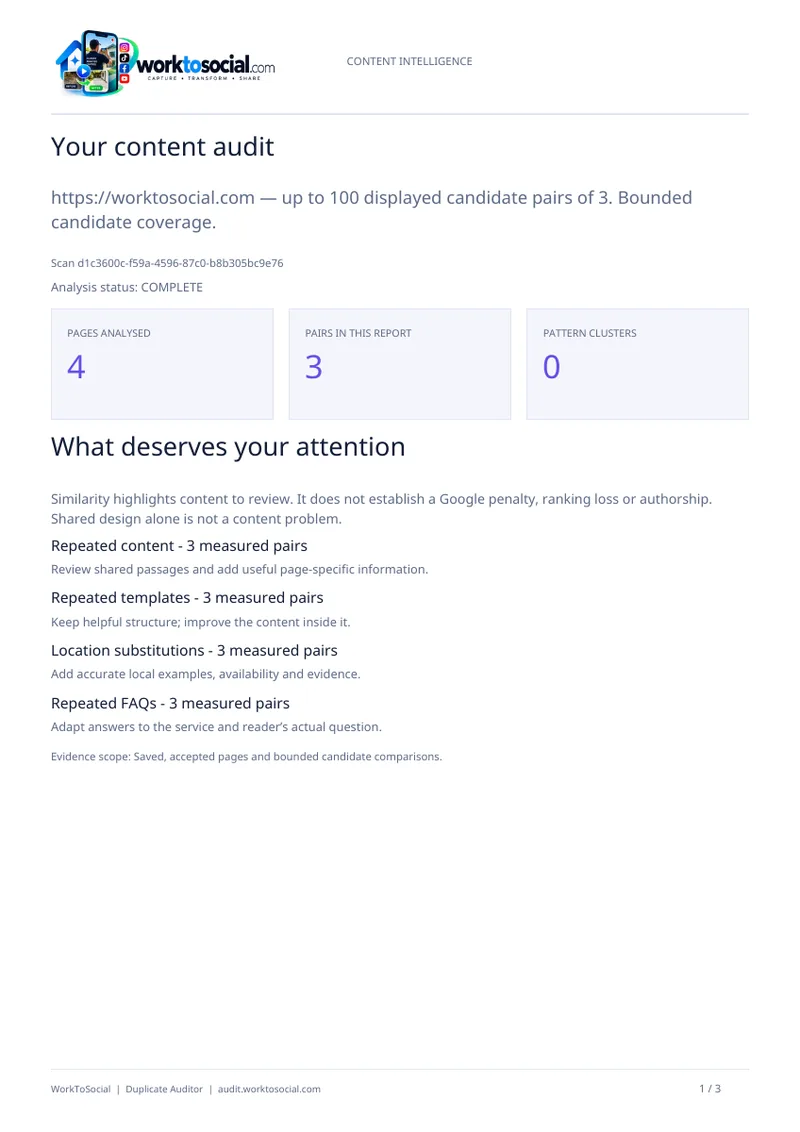
Do not write a confident site-wide conclusion while processing is still incomplete. Wait for the relevant results, then compare discovered, analysed and failed URL counts. If your question concerns a particular service section, check whether those URLs appear in the available scan. A finding about four analysed pages and a finding about an entire website are different claims, even when the report is easy to share.
Review a small sample across content and technical findings
Choose a handful of important URLs and inspect the evidence behind the findings. A service page that attracts enquiries deserves attention because people rely on its information. An old campaign page may deserve a different priority. The tool helps identify issues; the business context helps you decide their order.
For repeated content, read the matching passages and the complete source pages. Shared navigation, contact details and standard terms can be useful. Ask whether the main explanation answers a distinct customer question. Our guide to finding duplicate content without deleting useful information gives a detailed workflow for that part of the review.
For titles, descriptions and main headings, check whether the available values explain the page clearly. For link and potential orphan-page observations, check crawl coverage before assuming a page has no incoming links anywhere. A scan graph with no observed inlinks is a reason to investigate, not definitive proof of isolation. Review recorded HTTP or redirect evidence in the same way: inspect the affected URL and its context before proposing configuration changes.
Use a hypothetical example to assign sensible priorities
Imagine a small cleaning company reviewing its service section. This is a hypothetical example, not a customer result. The scan suggests that two pages share most of their introduction, one page has an unclear title and another has no observed incoming links in the available crawl.
The reviewer opens the source pages. The shared introduction is accurate, but one page fails to explain what preparation the customer needs to do. The unclear title belongs to a current service page, while the apparently isolated page is an older offer that may still be linked from a section the scan did not reach.
A useful first queue could therefore contain three different actions. Ask the service team to confirm preparation instructions, propose a clearer title for editorial approval and investigate the old offer's current purpose and wider link coverage. There is no need to delete the offer immediately or rewrite every repeated sentence. Each task has a reason connected to a visitor need and a stated uncertainty that someone can resolve.
Create a handover that explains the decision as well as the finding
For each chosen task, record the source URL, observed issue, scan date, relevant evidence and proposed next step. Add an owner and the information needed before editing. A writer may need confirmation from operations, while a redirect or navigation change may need the person who manages the website.
Keep observations separate from interpretations. For example, a repeated heading is an observation. The claim that the heading makes two services difficult to distinguish is an interpretation that should be checked against the pages and their intended audiences. A recommendation should explain what a visitor would understand better after the change.
Where the purchased product includes reports, PDF can support a readable discussion and CSV can support organising follow-up work. Free Scan has no PDF or CSV export. Keep reports within the applicable availability period, and retain the scope alongside them. A portable file should not lose the important fact that some URLs failed or were outside the scan. A colleague needs that context to assess how far the recommendation can reasonably reach.
Make one controlled improvement and verify it on the site
Start with a change whose purpose is clear and whose facts can be confirmed. Read the draft before publishing it. If you add preparation guidance, check that it matches the actual service. If you revise a title or heading, check that it still describes the right page. Useful detail is more valuable than swapping words simply to reduce similarity.
After implementation, open the affected page and check its text, links and next step. When a change involves removing, consolidating or redirecting a URL, have the responsible website professional review the wider effect before acting. Keep a short record of what changed and why so later reviews do not repeat an already resolved discussion.
A later scan, subject to your allowance, can help inspect the new evidence. It does not prove a ranking, enquiry or revenue improvement. Likewise, overlapping topic terms do not establish competition in search results, and writing-style observations do not prove authorship. Use the audit to support an editorial and technical workflow, while assessing business outcomes with the evidence appropriate to those outcomes.
Close the first audit with a clear next step
A first review is complete when another person can understand its scope, the most useful findings and the next actions. It does not require every available warning to disappear. Keep a small queue that can actually be finished, record unresolved coverage questions and decide when another review would be justified.
Ask whether the audit made an important customer answer easier to find or identified a specific question the team can resolve. If the result is only a collection of percentages, return to the original business purpose before commissioning more work. The value comes from the decision and the improvement, supported by evidence you can inspect.
To begin your own review, visit Duplicate Auditor, check the current eligibility and allowances, and follow the normal registration and scan steps. Choose one authorised website and plan a short evidence-review session. A careful first audit gives you a repeatable method for understanding your site without turning every observation into an unnecessary rewrite.
Competitor Spy and Duplicate Auditor have their own plans and usage limits. Media & Social is coming soon. Product findings support human review; they do not guarantee rankings or commercial results. Check the linked product pages for current details.