
Begin with a customer question, not a similarity target
A website can collect repeated text almost unnoticed. A service description becomes the starting point for another page. A location template is copied into a new area. An old offer stays online after a replacement is published. Eventually, the team knows that something needs reviewing but cannot tell which pages deserve attention first.
Start by defining the problem a visitor might encounter. Perhaps two pages appear to describe the same service but give different preparation instructions. Perhaps location pages contain little beyond a changed place name. These are useful review questions because the answers can lead to a specific improvement. A goal such as removing every repeated sentence provides much less direction.
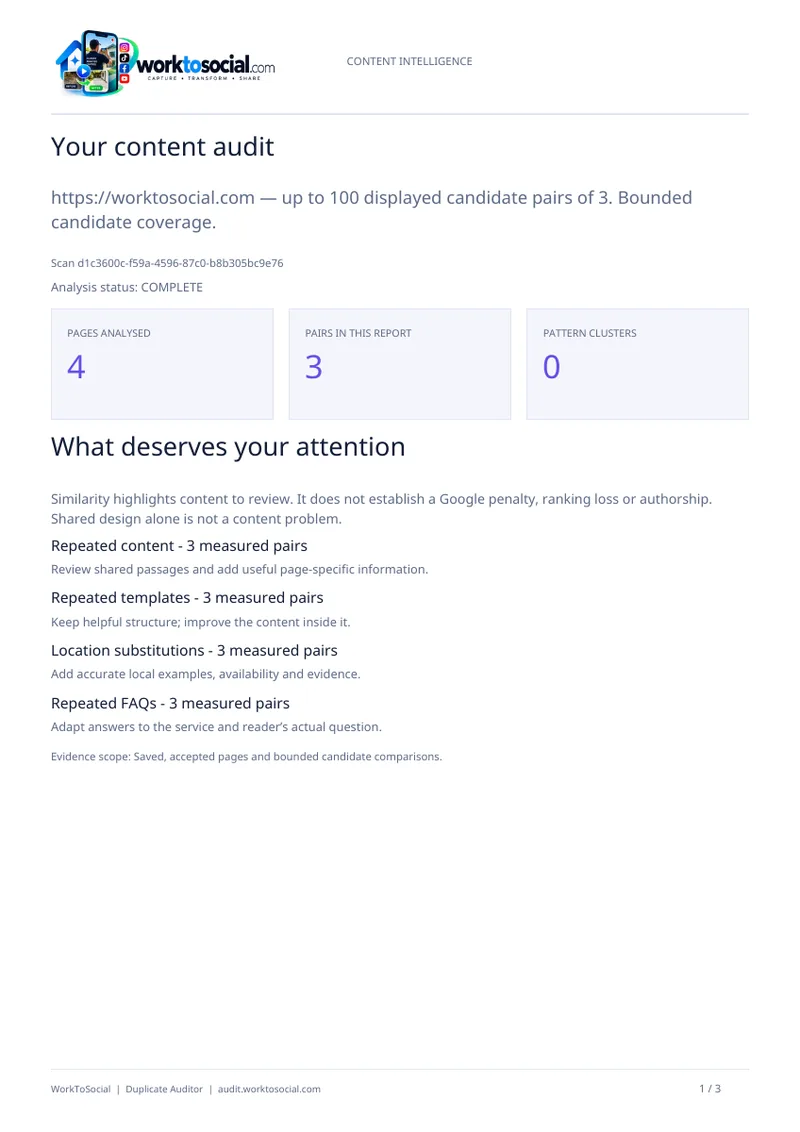
WorkToSocial Duplicate Auditor helps identify comparisons within the available website scan. It provides evidence to inspect, rather than an instruction to delete. If you are new to the wider toolkit, our introduction to WorkToSocial explains how a website review differs from competitor monitoring and the forthcoming media workflow.
Separate exact repetition, near repetition and the shared template
Exact repetition means the same text appears more than once. Near repetition describes substantial overlap with small changes, such as replacing a service name or rearranging sentences. Both can be useful clues, but neither tells you whether the material is unnecessary. Read enough surrounding content to understand what the passage contributes.
A common template deserves separate consideration. Menus, contact details, opening hours, legal wording and standard calls to action often belong across a website. On a short page, those elements can represent a large proportion of the extracted text. Removing them simply to change a percentage could make the site less consistent or harder to use.
Duplicate Auditor supports both content similarity and template similarity review. Use that context to ask whether the overlap sits in the page framework or its main explanation. Automated extraction can misunderstand an unusual layout, so compare the finding with the original page. The important distinction is between a useful shared fact and an entire page that adds little information for its intended reader.

Run a bounded scan and inspect what was actually analysed
Choose a website you own or have permission to scan. On the Duplicate Auditor product page, review the current allowance and workflow before starting. Registration and email verification are part of the eligible Free Scan route. The application also checks the website address and entitlement before analysis begins.
Keep the first review manageable. A large site does not require an immediate rewrite of every section. You can begin with a business question about service or location content, then use available results to identify a small set of comparisons. The Free Scan has a bounded allowance and displays its top results; paid reporting and larger allowances depend on the selected product.
Check discovered, analysed and failed URLs before drawing conclusions. A URL limit is a maximum, not a promise that every page will be accessible. Login requirements, unavailable pages and discovery limitations can leave gaps. Record the date and scope of the scan beside your notes. If an important page was not analysed, its absence is a coverage question rather than evidence that it contains no repetition.
Read a matching pair as two complete customer journeys
Open one relevant comparison and visit both source pages. Write down what each page is supposed to help someone do. A page about a complete kitchen replacement may share installation details with a smaller refurbishment service, while still answering different questions. The shared wording alone does not establish that the pages should become one.
Inspect the title, main heading, introduction and substantial body sections. Then check the useful differences: scope, exclusions, preparation, availability and the next step. Are those differences accurate and easy to find? Does the page explain them, or are you relying on knowledge that only the business team has?
A hypothetical cleaning company might have three location pages with the same equipment paragraph. One adds genuine access and booking information for that area; another changes only the district name. The first may need no change to the shared paragraph. The second may need better information, or a discussion about whether it serves a distinct purpose. This is an illustrative example, not a customer result or a claim that a particular similarity level proves a defect.
Choose between keeping, improving and consolidating
Give each reviewed pair a reasoned decision. Keep shared wording when it is accurate, useful and appropriate in both places. Improve a page when it has a distinct purpose but fails to explain that purpose clearly. Consider consolidation when two pages genuinely answer the same need and maintaining both adds confusion rather than value.
An improvement should add substance rather than substitute synonyms. Ask the service owner for the practical detail a customer needs: what is included, what information to provide, which situations need an assessment, or how an appointment proceeds. Preserve supported facts and avoid inventing local expertise, prices or outcomes just to make text look different.
Consolidation needs a wider website check before implementation. Review internal links, navigation and the role of each URL. If removing or redirecting a page is appropriate, have the responsible website professional plan the change and verify its effects. A similarity report does not choose a destination URL or prove what search engines will do. There is no reason to rush a destructive change merely because a comparison looks striking.
Build an editing queue that another person can finish
Turn the review into a small working queue. For each task, record the two URLs, the repeated passage, the reason for concern, the proposed action and an owner. Add the evidence date and any uncertainty about crawl coverage. A colleague should be able to understand the task without repeating the entire investigation.
For the hypothetical location page above, a useful task could be: ask the operations team whether appointment access differs in this area; add confirmed guidance if it does; otherwise review whether the page needs a separate place in the service navigation. That is more actionable than asking a writer to make the text unique. It also leaves room for the correct decision to be no change.
Where your entitlement includes exports, use the available PDF or CSV report to support the handover. Free Scan does not include those exports. A report is supporting evidence, while the queue records the business decision. Keep purchased reports within the applicable availability period and avoid assuming that someone else can infer the intended edit from a list of matches.
Verify the edit and keep the limits attached to the findings
After editing, read the affected pages again as a visitor. Confirm that useful information remains accurate, links work and the next step is clear. If a page was consolidated, check the implemented navigation and URL behaviour with the person responsible for the site. Record what changed so a later reviewer can understand the decision.
A later analysis can help you compare the available evidence, subject to your allowance. It does not automatically establish that the edit improved rankings, enquiries or sales. Those outcomes need their own appropriate evidence. Likewise, overlapping topic words do not prove search-result competition, and writing characteristics do not prove whether a person or an AI system wrote a passage.
Repeat the process on another small group only when the first tasks are understood. A sustainable review preserves helpful boilerplate, strengthens weak explanations and keeps scope visible. To begin, review Duplicate Auditor and its current Free Scan allowance, choose an authorised website and inspect one comparison carefully. One well-supported editing decision is a practical result you can build on.
Competitor Spy and Duplicate Auditor have their own plans and usage limits. Media & Social is coming soon. Product findings support human review; they do not guarantee rankings or commercial results. Check the linked product pages for current details.